Veratype LabVerazentrix

Remote access without leaving a door open to the internet.

Verazentrix keeps your gateways hidden until someone is approved — then shows only the apps they are allowed to use. On the firewalls you already run.

The dilemma

Classic remote-access portals leave the door listening

Exposed gateways continuously accept external traffic. That unmanaged attack surface invites CVE exploitation, credential stuffing, and lateral movement — while standing privileges linger after people should have left.

  • Always-open portals Built-in remote-access listeners on classic firewalls stay visible to internet scans around the clock.
  • Password-only risk Static credentials on a vulnerable portal are not a control plane — they are a standing target.
  • Broad trust after connect A successful tunnel often implies network-level access instead of role-tailored services.

Verazentrix — from brand Veratype — is the control plane that changes that process: pre-authenticate out-of-band, open reach only for that source IP, bound the session, then present a Zero Trust catalog.

What Verazentrix offers

Two clear paths — pick what you need

Same product. Different depth. Choose the integrated air-gap stack with internal ZTNA, or run standalone ZTNA on its own.

Path 1

Integrated air-gap with internal ZTNA

For isolated networks that need both time-limited reach on the perimeter and an internal ZTNA for apps. Users request access; Verazentrix grants and revokes on your existing gear and publishes services inside the same environment — with no cloud VPN required for core access.

Path 2

Standalone ZTNA

For teams that mainly need identity-aware access to internal apps through a service catalog. Run ZTNA on its own — without the full air-gap integration — so anyone can adopt it for everyday app reach.

Core value pillars

How Verazentrix changes the access process

Five operating pillars — from hiding the gateway to alerting the SOC — without forcing a new firewall purchase.

Pillar I

Pre-authentication & attack surface elimination

Deny-by-default stealth posture: unauthenticated parties see a black hole. Ports unlock only after out-of-band pre-auth — SMS IP dispatch, messaging bots, or FIDO2 Passkey / WebAuthn — and only for that source IP.

Pillar II

Centralized control plane & session management

Time-bound access per user, concurrent session caps to stop credential sharing, and multi-device orchestration that maps identity to the right routers and firewalls.

Pillar III

Post-connection Zero Trust

Connect is stage-one verification only — no broad subnet privilege. Users land in a role-tailored service catalog; SSO is built-in or federated to your IdP; Layer 4 mTLS covers user-to-machine and M2M paths.

Pillar IV

Integrated event & alert messaging

Real-time relays filtered by severity and role groups. Dispatch via SMS or enterprise messaging bots so the SOC can respond inside the process it already runs.

Pillar V

Modular architecture — no rip-and-replace

Adopt Verazentrix in phases on MikroTik, Fortinet, Sophos, Cisco, pfSense, OPNsense, and other supported gear. Start with the control plane, the ZTNA catalog, or both — without replacing the perimeter you already trust.
Phased adoption

Three ways to deploy Verazentrix

Same product. Different depth. Pick the operating mode that matches how you work today.

Mode 1

VPN Control Plane

Pre-authentication, stealth gateway management, and session control — focused on eliminating standing exposure on your existing transport path.

Mode 2

Service Catalog & ZTNA

Identity-driven application access and SSO — for teams that need role-tailored apps without the full stealth transport stack.

Mode 3

Full-Stack Hybrid

Unifies both layers — from network transport to application presentation — for 360° control without replacing existing firewalls.

What it governs

Ports, apps, and users — in both paths

Whether you run the air-gap stack or standalone ZTNA, Verazentrix decides who can get in, what they can touch, and when access stops.

Ports

Time-limited network access

Staff request IP or port access by SMS, API, or passkey. Verazentrix applies the change on your MikroTik, Fortinet, Sophos, Cisco, pfSense, OPNsense, or other perimeter device, then removes it when the session ends.

Apps

ZTNA for internal services

Admins publish the apps people need and decide who may see each one. Staff sign in with the identity process you already run — or Verazentrix’s own SSO if you want a self-contained plane — then open only the catalog entries policy allows.

Users

People, groups, and history

Operators set who may request access, in which hours, and how many sessions they may hold. Every grant, deny, and catalog action leaves a trail your SOC can investigate in the SIEM you already use.

Strategic comparison

Classic firewall remote access vs. Verazentrix

What changes for CIOs, CISOs, and IT leaders when the control plane moves outside an always-open portal.

Dimension Classic firewall remote access Verazentrix
Gateway exposure Always-open ports visible to internet scans Stealth gateway; deny-by-default (IP hidden until pre-auth)
Pre-authentication Static password / always-listening portal Out-of-band pre-auth (SMS, bot, Passkey, WebAuthn)
Access authorization Broad network-level implicit trust Zero Trust service catalog & role-based micro-access
Transport security Standard encrypted tunnels Layer 4 mTLS for M2M and user-to-machine traffic
Deployment Rigid; often tied to hardware replacement Modular control plane on existing infrastructure

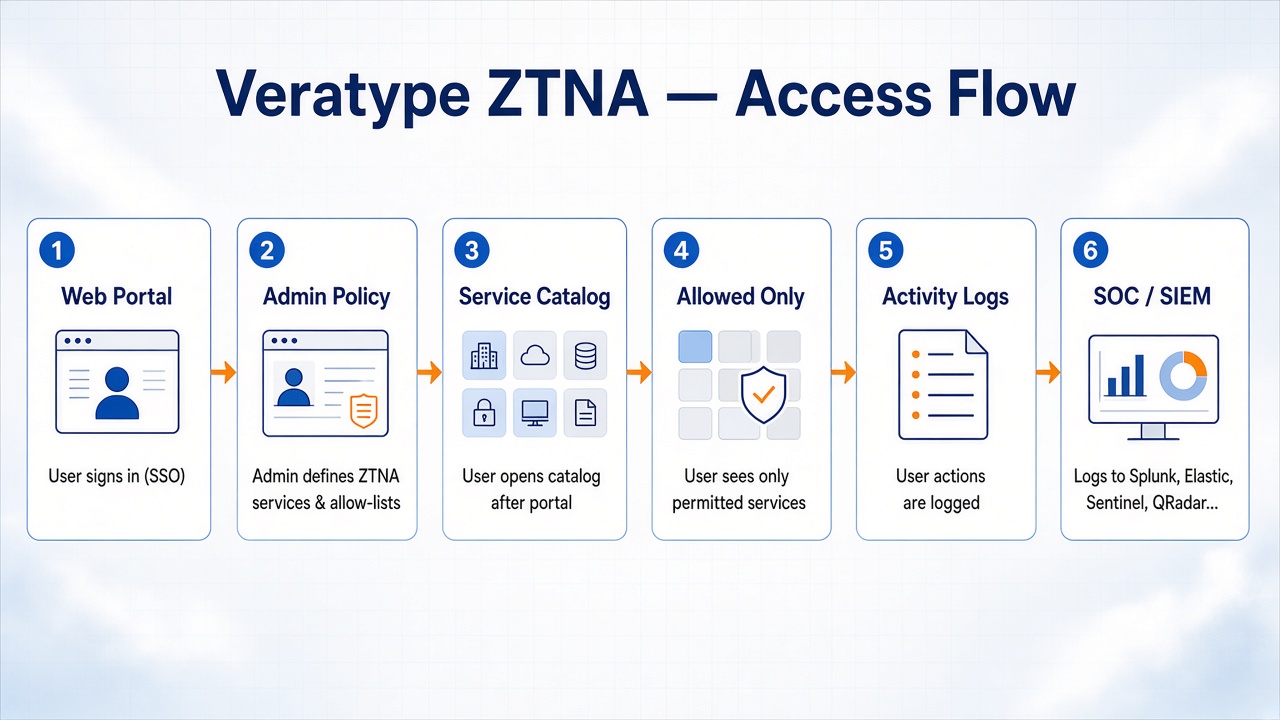
Post-connection process

From portal login to SOC-visible activity

After stage-one verification, Verazentrix routes users to a role-tailored catalog. Admins define services and allow-lists; users see only what they may use; activity feeds the SOC.

Verazentrix ZTNA flow: user signs in at the web portal, admin defines services and allow-lists, user opens the service catalog and sees only permitted services, actions are logged, and events feed the SOC process.

How it works

Pre-authenticate. Bound the session. Segment the apps.

You keep the firewall. Verazentrix runs the decision loop — from out-of-band request to stealth open to Zero Trust presentation.

Out-of-band pre-auth

The user proves intent via SMS, messaging bot, or Passkey / WebAuthn before any gateway listener is useful to them.

Stealth open + session policy

Verazentrix unlocks reach only for that source IP, applies time bounds and session caps, and orchestrates the change on your existing gear.

Zero Trust catalog

Connect is not blanket trust. The user enters a role-tailored service catalog; mTLS and SSO options harden who and what may proceed; alerts keep the SOC in the loop.

Getting started

Deploy on your network — either path

Install next to the network you already protect. Connect the gear you have. Choose integrated air-gap with internal ZTNA, or standalone ZTNA.

  1. Install the appliance

    Deploy on your site. Access decisions stay under your control — not in a vendor cloud.

  2. Connect your gear

    Point Verazentrix at MikroTik, Fortinet, Sophos, Cisco, pfSense, OPNsense, or other supported routers and firewalls you already operate.

  3. Choose your path

    Enable the integrated air-gap stack with internal ZTNA, or start with standalone ZTNA for app access and grow from there — or run Full-Stack Hybrid when you need both layers.

FAQ

Questions leaders ask about Verazentrix

What is Verazentrix?

Verazentrix is the product from Veratype Lab — an orchestration-layer security control plane. It eliminates standing network exposure with deny-by-default stealth gateways, out-of-band pre-authentication, granular session controls, and post-connection Zero Trust Network Access, using the firewalls and routers you already operate.

What two paths does Verazentrix offer?

Two paths. First: integrated air-gap access with an internal ZTNA — grant and revoke reach on your perimeter gear and publish apps inside the same isolated environment. Second: standalone ZTNA that anyone can run for identity-aware access to internal services, without the air-gap stack. You can also phase technical modules (Control Plane, Catalog & ZTNA, or Full-Stack Hybrid) as you adopt.

How is Verazentrix different from classic firewall remote access?

Classic firewalls often ship always-open remote-access features — SSL-VPN portals on platforms such as FortiOS are a common example. Those listeners stay visible to the internet and frequently lean on a vulnerable portal plus static credentials. Verazentrix keeps a stealth, deny-by-default posture: reach opens only for a source IP that completed out-of-band pre-authentication (SMS, bot, or Passkey/WebAuthn). After connect, users get a Zero Trust service catalog instead of broad network trust.

What does the stealth control plane do exactly?

It is an external control plane that orchestrates grant and revoke on existing firewalls and routers. Many devices lack a unified pre-auth and session workflow — or only offer it inside one vendor’s stack. Verazentrix centralizes that orchestration, drives changes onto your gear via native interfaces, and avoids locking you into a single vendor’s access suite.

Can Verazentrix run in an air-gapped network without a cloud VPN?

Yes. The integrated air-gap path is built for isolated networks. The appliance runs inside your perimeter. Core access control does not depend on a cloud VPN or outbound cloud relay.

Who can use standalone ZTNA?

Anyone who wants on-premise, identity-aware access to internal apps through a service catalog — without needing the full air-gap integration. Standalone ZTNA is the lighter path when you mainly need app reach and policy, not the full air-gap stack.

Can we adopt Verazentrix in phases?

Yes. Deploy VPN Control Plane mode for pre-authentication, stealth gateway management, and session control; Service Catalog & ZTNA mode for identity-driven app access and SSO; or Full-Stack Hybrid to unify both without replacing existing firewalls.

Do we have to rebuild user identity for ZTNA?

No. The B2B question is usually: will staff use one familiar login, or will IT stand up a second identity island? Verazentrix can run its own internal SSO when you need a self-contained identity plane, or plug into the directory and SSO you already operate — LDAP, Active Directory, or a federated IdP — so the catalog login is the same corporate identity your organization already trusts. That choice applies to both the integrated air-gap path and standalone ZTNA.

How do you trust the device, not only the user password?

SSO proves who signed in; it does not prove the endpoint is accepted. When that matters, Verazentrix supports Layer 4 mutual TLS (mTLS) so user-to-machine and machine-to-machine paths can require cryptographic proof of the client — stopping “valid user, unknown laptop” from opening internal apps.

How does the SOC see activity?

Verazentrix records the operating trail — pre-auth, session lifecycle, catalog allow/deny — and can relay operational and security alerts by role and severity via SMS or messaging bots. Events feed the SOC process you already run (Splunk, Elastic, Microsoft Sentinel, QRadar, and similar collectors), so access and monitoring stay one process.

How do users request network access?

Administrators choose the channels: SMS, API webhooks, passkeys, and identity login for the app catalog. After policy checks, Verazentrix opens time-limited reach on your existing firewall or router, then closes it when the session ends.

Does Verazentrix replace our firewalls?

No. It is a modular control plane on MikroTik, Fortinet, Sophos, Cisco, pfSense, OPNsense, and other supported gear — not a new firewall and not a rip-and-replace.

How much does Verazentrix cost?

Verazentrix is licensed software from Veratype Lab. Pricing depends on which path you choose, named users, number of firewalls or routers, and support needs. Request a walkthrough for a tailored quote.

Work with Veratype Lab

Ready to evaluate Verazentrix?

Tell us which path fits — integrated air-gap with internal ZTNA, or standalone ZTNA — which firewalls you already run, and how many users you need to cover. We will arrange a walkthrough.

Or email [email protected]